whatsp.app
CaracterísticasPreciosBlog
Iniciar sesiónEmpezar
whatsp.app

La herramienta de enlaces de WhatsApp todo en uno para empresas.

Producto

  • Generador de enlaces
  • Reclama tu enlace
  • Características
  • Precios
  • Blog

Empresa

  • Acerca de nosotros
  • Programa de afiliados
  • Ayuda
  • Contacto

Legal

  • Política de privacidad
  • Términos de servicio
  • Política de reembolso

© 2026 whatsp.app. Un producto de CS Digital.

Made with♥for WhatsApp businesses
The Ultimate Guide to the WhatsApp Link Generator
Volver al blog
whatsappmarketinglink generatorclick to chatbusiness toolsGuía

The Ultimate Guide to the WhatsApp Link Generator

5 min read
905 palabrasPublicado el 17 July 2026
Using a whatsapp link generator is one of the most effective ways for businesses to connect with their customers. In this guide, you will learn how to leverage a click to chat link, create a customized wa.me link, and effectively utilize a whatsapp business link to boost customer engagement. By removing the friction of saving numbers, your audience can initiate conversations instantly. We will dive deep into the differences between standard links and advanced solutions, giving you clear insights into improving your conversational marketing. Let's explore how these tools simplify digital communication for operations worldwide.
  1. 1.Why a WhatsApp Link Generator is Essential for Modern Business
  2. 2.Understanding the Varieties: Click to Chat Link and wa.me Link
  3. 3.Enhancing Customer Interaction with a WhatsApp Business Link
  4. 4.Selecting the Right Tool for Your Operations
  5. 5.Advanced Customization: Branded Links and Storefronts

Why a WhatsApp Link Generator is Essential for Modern Business

In the digital marketplace, reducing the friction between customer intent and business contact is crucial. Traditionally, a customer had to manually save a phone number before starting a chat on WhatsApp. A whatsapp link generator removes this barrier completely by creating a direct URL that instantly opens a conversation.Using a whatsapp link generator is one of the most effective ways for businesses to connect with their customers. In this guide, you will learn how to leverage a click to chat link, create a customized wa.me link, and effectively utilize a whatsapp business link to boost customer engagement. By removing the friction of saving numbers, your audience can initiate conversations instantly. We will dive deep into the differences between standard links and advanced solutions, giving you clear insights into improving your conversational marketing. Let's explore how these tools simplify digital communication for operations worldwide.

* Frictionless communication — Customers no longer need to manually save your business number to their contacts.

* Improved lead generation — Instantly route users from social media bios, email signatures, or online marketplaces directly into a chat.

* Higher conversion rates — Immediate access to a customer support agent means quicker resolutions and faster sales closure.

Understanding the Varieties: Click to Chat Link and wa.me Link

When dealing with WhatsApp links, you will frequently encounter terms like click to chat link and wa.me link. These concepts refer to the exact same underlying mechanism provided by Meta, though they are configured in slightly different ways.

A click to chat link functions by utilizing the official WhatsApp URL structure. When clicked, it instructs the browser or device to open the WhatsApp application immediately. A wa.me link is simply the official shortened domain version of this tool. For instance, a basic URL looks like [https://wa.me/919876543210](https://wa.me/919876543210), where the number includes the exact country code without any extra characters like plus signs or zeroes.

To make the process easier, using a free tool like the whatsp.app free generator allows you to instantly create these links without needing to memorize the URL formatting rules. You can also review our detailed guide on how to create a WhatsApp link for a full breakdown of standard creation.
A clean digital interface showing a whatsapp link generator tool with custom text options." | Subject: A modern dashboard showing input fields for a phone number and a pre-filled message, showcasing the user interface of an online link creator tool.

Enhancing Customer Interaction with a WhatsApp Business Link

If you operate a commercial profile, utilizing a dedicated whatsapp business link brings additional utility to your marketing channels. This link can be configured to contain pre-filled messages. When a user clicks your link, a preset template text automatically populates their chat box, allowing them to send messages like "I am interested in your pricing" with a single tap.

Using predefined messages helps businesses categorize incoming traffic. You will know exactly whether a customer came from an Instagram ad, a YouTube video description, or an email newsletter based on the text they send.

Selecting the Right Tool for Your Operations

Choosing how to manage your chat links depends entirely on your business scale and feature requirements. While standard links are useful, specialized tools provide additional branding, analytics, and management features.

Feature / GoalStandard wa.me Linkwhatsp.app ToolsWhatsApp Business API
CostFreeFree to Paid OptionsVariable (Per-message fees)
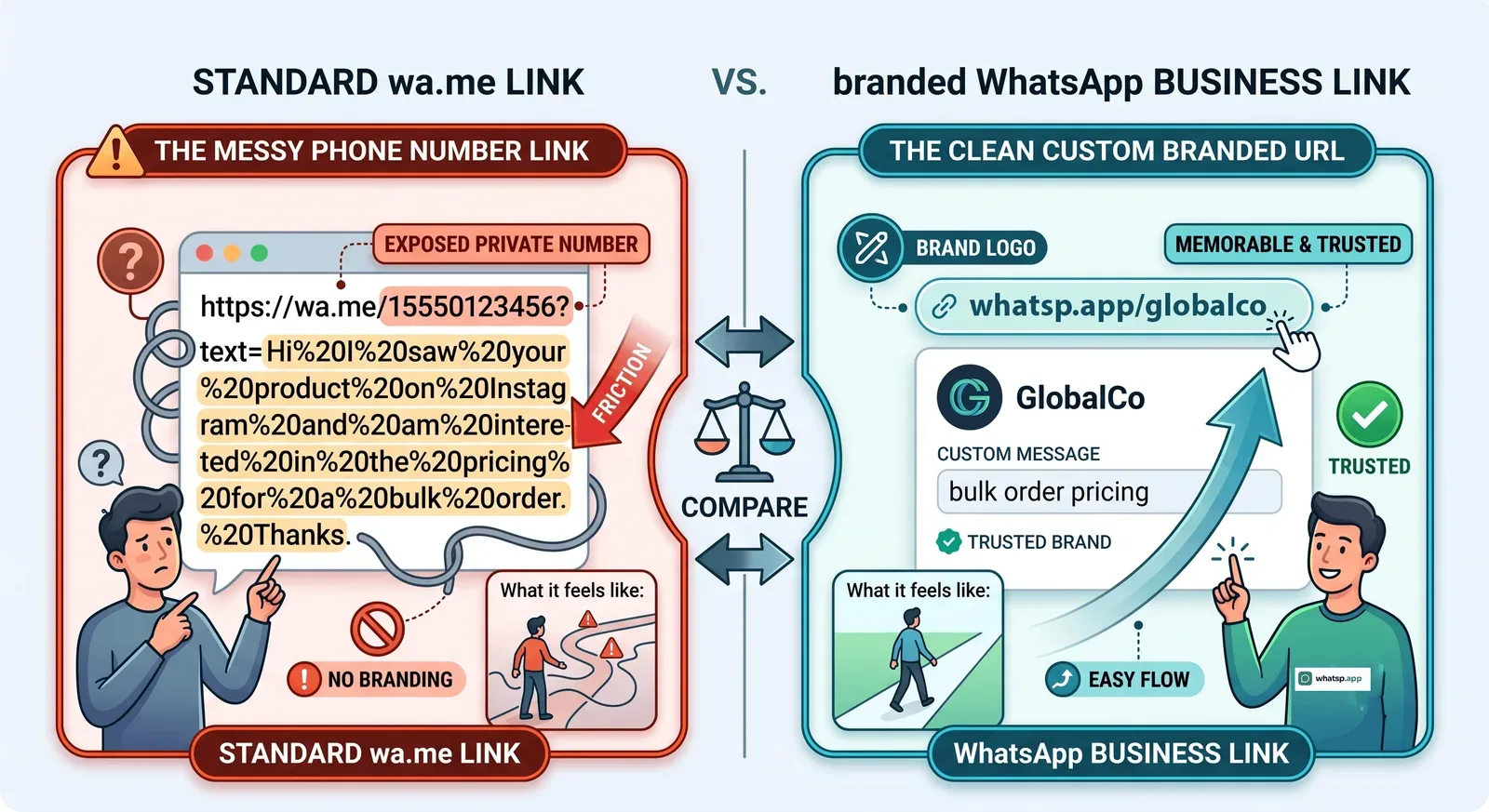
Custom BrandingNo (Shows phone number)Yes (e.g., whatsp.app/yourname)No (Uses official API hooks)
Analytics TrackingNoneAvailable on Paid PlansComplex Developer Analytics
Storefront IntegrationNoneGrowth/Pro PlansCustom Developer Build

If your operation grows beyond a basic setup and you need to compare enterprise solutions, read our analysis on whatsapp link vs whatsapp business api to determine which infrastructure fits your trajectory.

Advanced Customization: Branded Links and Storefronts

For businesses focused on building trust, displaying a raw phone number in a URL can sometimes look unprofessional or untrustworthy. Transitioning to a branded short link solves this issue completely by masking the phone number with a clean corporate identifier.

* Branded short links — Secure a recognizable URL to elevate your brand identity across channels by exploring the available whatsp.app pricing plans.

* Public storefronts — Display up to 300 products, receive direct client reviews, and allow customers to browse your inventory before initiating a conversation.

* Team management — Allow up to 3 staff members to log in and manage your account details seamlessly under premium tiers.

For technical guidance on deployment or managing custom domains, you can always visit our comprehensive whatsp.app help center to view documentation.

Gratis por 10 días

Prueba el plan Growth gratis durante 10 días

Desbloquea enlaces de marca, escaparate, productos y analíticas — no se requiere tarjeta.

Empezar prueba Growth gratis

Preguntas frecuentes

Ve a whatsp.app, selecciona tu país, ingresa tu número de WhatsApp y haz clic en Generar. Tu enlace para chatear estará listo en segundos: no necesitas cuenta ni registrarte. También puedes añadir un mensaje prellenado para que los clientes sepan cómo saludarte. Copia el enlace y compártelo en cualquier lugar: biografía de Instagram, Perfil de Empresa de Google, firma de correo electrónico o en tu sitio web.
Un enlace de clic para chatear de WhatsApp es una URL especial en el formato wa.me/[numero] que, al tocarse, abre un chat de WhatsApp con una persona o empresa específica. El cliente no necesita guardar tu número: simplemente toca el enlace y WhatsApp se abre directamente. Funciona en móviles, tabletas y computadoras de escritorio, y es una de las formas más rápidas de conectar a los clientes con tu negocio.
Sí. En el generador de whatsp.app, agrega tu mensaje en el campo de texto antes de copiar el enlace. Cuando alguien toque el enlace, tu mensaje estará escrito previamente en su cuadro de chat. Úsalo para saludos como 'Hola, me gustaría hacer un pedido...' o para consultas como 'Por favor envíame su lista de precios.' Puedes crear enlaces diferentes con mensajes distintos para diferentes campañas.
Genera tu enlace de WhatsApp en whatsp.app y descarga el código QR desde esa misma página: no hay pasos adicionales. Imprímelo en menús, empaques, tarjetas de presentación, exhibidores de mostrador o bolsas de entrega. Los clientes lo escanean con la cámara de su teléfono y entran directamente en un chat contigo. El código QR funciona para cualquier número de WhatsApp en todo el mundo y admite mensajes prellenados.
Un enlace de WhatsApp de marca es una URL corta y memorable como whatsp.app/tumarca que redirige a tu chat de WhatsApp. En lugar de compartir un largo enlace wa.me, compartes una URL limpia que genera confianza y es fácil de recordar. Los enlaces de marca en whatsp.app también incluyen análisis de clics para que puedas hacer un seguimiento de cuántas personas abrieron tu enlace y desde qué país.
Genera tu enlace de WhatsApp en whatsp.app, luego haz clic en el botón Fragmento HTML para copiar un código de botón listo para pegar. Pégalo en cualquier lugar del HTML de tu sitio web: barra lateral, pie de página o sección de contacto. También puedes usar fragmentos de Markdown para plataformas como Notion o GitHub. No se requieren conocimientos de programación; el fragmento incluye el ícono verde de WhatsApp y abre el chat al hacer clic.
Absolutamente. Los enlaces de WhatsApp funcionan en biografías de Instagram, publicaciones de Facebook, anuncios de Google, boletines informativos, campañas de SMS y materiales impresos. Cada clic abre una conversación directa: sin formularios, sin tiempo de espera. Para campañas, crea enlaces separados con diferentes mensajes prellenados para que puedas medir qué canal genera más conversaciones. Usa enlaces de marca para un seguimiento limpio sin parámetros UTM.
Un escaparate de WhatsApp en whatsp.app es una página de catálogo de productos optimizada para dispositivos móviles (con el nombre de tu empresa, logotipo, productos, precios y un botón de pedido de WhatsApp) que se aloja en tu enlace de marca. No necesitas un sitio web ni habilidades técnicas. Los clientes exploran tus productos y tocan para ordenar a través de WhatsApp. Es perfecto para pequeñas empresas que venden a través de WhatsApp y desean una presencia en línea profesional.
Los enlaces wa.me gratuitos generados en whatsp.app nunca caducan: son URL estándar de WhatsApp. Los enlaces cortos de marca (como whatsp.app/tumarca) permanecen activos mientras tu suscripción esté activa. En el plan Pro, los enlaces y escaparates permanecen en línea durante el período de suscripción. Si cancelas, el enlace de marca entra en un período de gracia antes de caducar, dándote tiempo para renovar.
No. whatsp.app es un producto independiente y no está afiliado, respaldado ni patrocinado por WhatsApp Inc. o Meta Platforms. WhatsApp es una marca comercial de WhatsApp LLC. Eres responsable de seguir los términos de servicio de WhatsApp al enviar mensajes a los clientes. whatsp.app no forma parte de la API de WhatsApp Business y no requiere ninguna aprobación de Meta para usarse.

Conclusión

Los enlaces de WhatsApp eliminan la fricción entre tu negocio y tus clientes: con un solo clic ya están conversando. Con el generador gratuito de enlaces de WhatsApp de whatsp.app, puedes crear enlaces de clic para chatear, añadir mensajes prellenados, generar códigos QR y reclamar URL cortas de marca, todo sin registrarte. ¿Listo para empezar? Crea tu enlace de WhatsApp gratuito ahora o construye un escaparate de marca en WhatsApp para exhibir tus productos y hacer crecer tu negocio.

Empezar gratis

¿Listo para crear tu enlace de WhatsApp?

Usa nuestro generador de enlaces gratuito de WhatsApp, sin necesidad de registro. O reclama tu enlace corto de marca y crea un escaparate de WhatsApp.

Crea tu enlace de WhatsApp gratuito →Reclama tu enlace de marca →